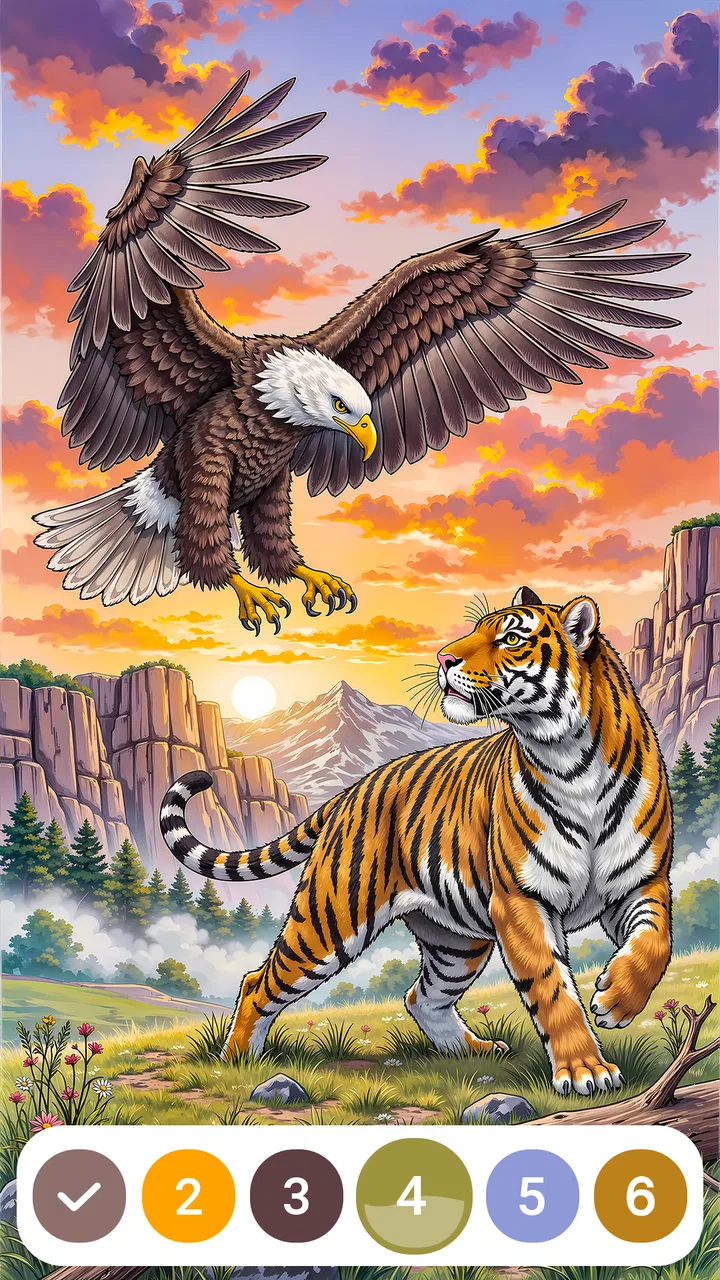
Wildlife Color by Number
- 4.8
- Rating
- 50.00K
- Installs
- Free
- Price
 Analysis by App-foxy
I went into Wildlife Color by Number expecting a simple way to fill a few quiet minutes, and that is exactly where it works best. It is a free board game from BrainArt Studio built around coloring wildlife scenes by matching numbered areas with their corresponding colors. The idea is familiar, but the appeal comes from how little preparation it needs: choose a picture, identify the next marked section, and keep going until the image takes shape.
What I like most is that it sits between a traditional coloring book and a light puzzle. You are not choosing every color from scratch, so it does not demand artistic confidence. At the same time, you still need to scan the picture, locate small regions, and decide whether to work methodically or jump between visible areas. That makes it a comfortable choice when I want something calmer than a competitive game but more engaging than simply watching a screen.
The game is listed for everyone, which fits its approachable design. It is free to start, while optional in-app purchases range from $0.99 to $39.99 per item. That difference matters: someone looking for a completely cost-free coloring experience should pay attention to purchase prompts, while a casual player can begin without paying. It has reached over 50 thousand installs and holds a 4.8 average from over 700 ratings, so there is already a modest player base behind it.
You May Also Like

 Blood Strike: 2.5 Anniversary
Blood Strike’s Loadouts Turn Every Drop Into a Tactical Gamble
A close look at Blood Strike’s custom loadouts: how fast access to signature weapons reshapes its battle royale rhythm, rewards preparation, and narrows the gap between fights.

 Pandora - Music & Podcasts
Pandora’s Music Is Easy to Start, but Harder to Recover
Pandora’s strength is its low-effort path from a seed to a station. Its weak spot is how much confidence it asks you to place in connection, setup, and quiet recovery.

 8 Ball Pool
 Is Built on Rivalries, Rematches, and Routine
A close look at the rivalries, rematches, shared routines, and unanswered safety questions that turn a quick pool match into a persistent mobile community.

 Samsung Music
’s Quiet Strength Is Playing What You Already Own
Its reach comes less from spectacle than from dependable access to a personal library. That simplicity is both the app’s strongest retention engine and its ceiling.

 AccuWeather: Weather Radar
AccuWeather Review: A Quick, Clear Forecast for Everyday Decisions
For everyday plans, the best forecast is the one you can understand quickly. AccuWeather makes rain timing, radar, and local conditions easy to act on, with a few trade-offs.

 Hill Climb Racing
Why Hill Climb Racing Still Turns Crashes Into One More Run
A tiny car, a bumpy hill and one more upgrade: Hill Climb Racing keeps resurfacing because its simple chaos makes every near-miss feel personal.
More From Our News Desk
View All News


How I use Wildlife Color by Number in ordinary play
I use Wildlife Color by Number as a small, deliberate break rather than something to rush through. In this section, I’ll focus on how choosing a scene to match my available attention and grouping work by color can make ordinary play feel smoother. That practical routine also helps clarify where the game’s gentle pace is a strength—and where a more demanding alternative may suit you better.
A simple routine that makes the game feel relaxing
My usual session starts with one practical decision: I pick a scene based on how much attention I have available, rather than choosing randomly. When I am tired, I prefer an image with broad, easy-to-see sections. When I want a little more concentration, I choose a picture with finer details and more scattered numbered areas. This small habit prevents the game from feeling either too demanding or too passive.
Once a scene is open, I normally begin with the color that appears easiest to locate. I do not try to complete the picture in visual order. Instead, I look for a cluster of matching sections and work through that group. This reduces the amount of searching between taps and gives the image visible progress early in the session. It also makes it easier to notice which parts still need attention.
The numbered format removes one common obstacle in digital coloring games: deciding which shade belongs where. I can focus on recognition and accuracy instead of worrying whether a particular green or brown looks right. For younger players, that makes the activity approachable. For adults, it creates a low-pressure routine that can be used during a short break, before bed, or while listening to something else.
There is still enough visual work to stop it from becoming completely automatic. Small regions can make me slow down, especially when several areas are close together. I found that using a deliberate rhythm—select a color, scan from one side of the image to the other, then move to the next color—is more reliable than tapping around without a plan. That is one of the first useful habits to build if you want the game to feel smooth rather than fiddly.
Where it fits better than a physical coloring book
A physical coloring book gives more freedom, but it also requires supplies, a flat surface, and a willingness to accept imperfect results. Wildlife Color by Number is easier to pick up when I have only a phone or tablet nearby. There is no need to sharpen pencils, choose a palette, or clean up afterward. The trade-off is that the digital format offers less personal expression because the numbered structure guides the final appearance.
Compared with a standard board game, this is not about competing with another person or planning several moves ahead. The board-game classification describes the structured, picture-based interaction more than a traditional tabletop match. If you want social strategy, direct competition, or a clear win condition, this will feel too quiet. If you want a gentle activity with a small amount of concentration, the format makes sense.
It also differs from open-ended drawing apps. Those tools reward experimentation and skill development, while this game is more forgiving. I can enjoy completing an animal scene even when I do not consider myself creative. That makes it particularly suitable for people who like the satisfaction of finishing an image but do not want a blank canvas staring back at them.
Three everyday situations where it works well
My favorite use is a short evening session. After a busy day, I can complete a few areas without committing to a long story, a timed challenge, or a multiplayer match. The repetitive scanning and tapping gives my attention somewhere uncomplicated to settle. I would not describe it as a substitute for professional relaxation support, but as a small screen-based wind-down activity, it is easy to understand and easy to stop.
It can also work during a waiting period, provided the device is comfortable to hold and the surrounding light is good enough to see small sections. A useful approach is to start a scene only when I know I can finish a small batch of areas. That creates a natural stopping point instead of leaving the picture half-finished after a rushed minute.
For families, the everyone rating makes it broadly accessible, but I would still treat it as a shared activity rather than assuming every child will use it independently. The numbered method can help a child practice matching and visual attention, while an adult can guide the search for tiny sections. The main limitation is that the game does not offer the same tactile experience as paper, crayons, or paint.
Settings and habits worth checking first
Before settling into a long session, I recommend looking through the available in-game settings rather than assuming the default setup is ideal. The most useful checks are practical: whether sound is comfortable, whether visual prompts are easy to follow, and whether the display feels readable at the device’s current brightness. I will not claim that every device presents the same controls, but checking what is available can prevent small annoyances from dominating the experience.
Sound is especially worth considering. Some players enjoy feedback while filling a section; others find repeated effects distracting during a quiet session. I generally test the game with audio on briefly, then decide whether it supports the mood I want. If I am listening to a podcast or music, reducing distractions makes the coloring routine easier to maintain.
Screen brightness is another overlooked factor. Fine wildlife details can be harder to distinguish when the display is dim, while maximum brightness may be uncomfortable indoors. I usually adjust the phone before blaming the artwork or the controls. A moderate brightness level and a clean screen make small numbered areas easier to inspect.
I also recommend checking how the game behaves around purchase prompts before handing the device to a child. The game is free, but optional items cost between $0.99 and $39.99 each. That does not make the free experience unusable, yet it does mean that family members should understand the purchase setup on the device. A few seconds of preparation is better than discovering an unwanted charge later.
Faster patterns for completing detailed scenes
The fastest method is not necessarily tapping as quickly as possible. Speed comes from reducing repeated searching. I use a left-to-right scan for each selected color, moving through the image in a predictable direction. If I lose my place, I restart the scan at the top rather than circling randomly. This is more useful on detailed wildlife pictures, where matching sections may be separated across the background, body, and foreground.
Another effective pattern is to finish obvious areas before chasing tiny ones. Large regions reveal the overall picture and make later details easier to interpret. They also provide a sense of progress without requiring constant zooming or close inspection. Once the broad shapes are complete, I can devote attention to small marks around eyes, fur, feathers, leaves, or other visual details without repeatedly switching between tasks.
I avoid changing colors too frequently. If I spot a second area using the current selection, I complete it immediately instead of switching away. This sounds minor, but it reduces mental overhead and makes the session feel less interrupted. The same principle applies to breaks: I stop after completing a color group or a recognizable part of the animal, not in the middle of a scattered search.
When a section is difficult to identify, I pause rather than tapping repeatedly. Rapid tapping can turn a simple visual problem into frustration. I first inspect the surrounding outlines, then compare the area with other marked regions on the same image. This patient approach is one of the clearest differences between a relaxing session and a tiring one.
What experienced play can and cannot improve
With practice, I became better at recognizing the game’s visual rhythm: broad sections first, repeated colors next, tiny isolated areas last. That is not a hidden feature or a special mode; it is simply a repeatable workflow. The benefit is that I spend less time wondering what to do next. The game remains simple, but the interaction feels more deliberate.
There are limits to that improvement. Better habits cannot turn a guided coloring game into a full art tool. The numbered system still controls the palette, and the player’s role is mainly to locate and fill the intended regions. If you want to mix custom shades, draw your own animals, or alter the composition, a dedicated coloring or illustration app will be a better match.
The same limitation applies to challenge. Wildlife Color by Number can require patience, especially when an image contains many small areas, but it is not the kind of board game that tests strategy against an opponent. There is no reason to recommend it to someone seeking tactical depth, a campaign, or a competitive ranking experience. Its strength is consistency, not complexity.
I also think the screen size affects the experience more than newcomers may expect. A larger display can make detailed scenes more comfortable, while a smaller phone may require more careful inspection. I would choose a tablet when available for longer sessions, but the game’s basic concept still works on a phone for short bursts. The important question is whether the marked areas remain comfortable to distinguish on your device.
Who should try it, and who should skip it
I would recommend it to people who enjoy wildlife imagery, gentle puzzle-like interaction, and visible progress without pressure. It is a good fit for a child exploring color matching with supervision, an adult who wants a quiet break, or anyone who likes the completion feeling of a coloring book but does not want to manage physical materials. The free entry point also makes it easy to test the basic experience before deciding whether optional purchases are worthwhile.
I would be more cautious about recommending it to artists looking for creative control. The appeal is following a prepared color map, not expressing an individual style. I would also point strategy-game fans toward a conventional board title instead. The numbered scenes provide light concentration, but they do not replace planning, negotiation, resource management, or competition.
People who dislike repetitive tapping may lose interest once the novelty of the animal pictures fades. The game’s calm structure is its identity, so it does not suddenly become a more demanding puzzle after a few sessions. That is not a flaw for the intended audience, but it is an important expectation to set before downloading.
Version, access, and the practical buying decision
The current version is 1.1.4, and the game requires Android 7.0 or later. That makes the operating-system requirement worth checking before installation, particularly on an older spare phone or tablet. On a compatible device, the free download gives me a straightforward way to judge the artwork, controls, and pacing without making an immediate commitment.
The purchase structure deserves a balanced view. Optional items from $0.99 to $39.99 can be reasonable for someone who wants to support the developer or access additional content offered through the game, but the upper end is not a casual impulse purchase for everyone. I would begin with the free experience, decide whether I am returning regularly, and only then consider spending. That is a more sensible approach than treating every available item as necessary.
BrainArt Studio has kept the central loop clear: select a scene, match the number, fill the area, and watch the wildlife image develop. That clarity is a strength because I rarely need instructions after the first few moments. It is also the reason the game may feel limited to players who expect frequent new mechanics. The value comes from the routine rather than from a deep progression system.
My verdict after settling into the routine
The best way to enjoy this game is to treat it as a focused coloring break, not as a conventional strategy board game. Once I stopped expecting complex rules, its strengths became clearer. It is approachable, visually centered, and easy to fit into everyday downtime. The numbered structure gives me enough direction to stay engaged while leaving the session free from timers, opponents, and complicated objectives.
The strongest practical tip is to create a repeatable sequence: check the sound and display, choose a scene that matches your available attention, clear broad regions first, scan by color in one direction, and leave isolated details for the end. That routine improves comfort without pretending the game has advanced shortcuts or hidden systems. It also makes it easier to stop at a natural point.
My reservations are equally straightforward. The experience may be too repetitive for players who need constant novelty, and the guided palette is not suitable for anyone seeking unrestricted creativity. Optional purchases also deserve awareness, especially on a shared family device. Those are meaningful trade-offs, but they do not undermine the game’s purpose.
For me, Wildlife Color by Number succeeds as a modest, calming board-style game with a clear audience. I would install it for quiet moments, casual family use, or a low-pressure activity after work. I would choose another app for serious drawing, competitive board play, or deep puzzle solving. If your ideal game is a peaceful wildlife image that gradually becomes complete through careful matching, this one is easy to recommend.
FAQs for Wildlife Color by Number
01What is Wildlife Color by Number and how does it work?
Wildlife Color by Number is a relaxing coloring app that allows users to paint detailed wildlife images using a color-by-number system. Each image is divided into sections with corresponding numbers that match a color palette. Simply select a color and tap on the matching numbered sections to complete the artwork.
02Is Wildlife Color by Number suitable for all ages?
Yes, Wildlife Color by Number is designed for users of all ages. The app provides a calming and engaging experience, making it ideal for both children and adults. Its intuitive interface ensures that even younger users can easily navigate and enjoy the coloring process without difficulty.
03Does Wildlife Color by Number require an internet connection?
No, an internet connection is not required to use Wildlife Color by Number. Once the app is downloaded and installed, users can access and complete coloring pages offline. However, an internet connection might be needed for initial downloads or to access additional content and updates.
04Are there any in-app purchases in Wildlife Color by Number?
Yes, Wildlife Color by Number may offer in-app purchases. While the app provides a variety of free images to color, additional premium content and features can be purchased to enhance the experience. These purchases are optional and not necessary to enjoy the basic functionalities of the app.
05Can I share my completed artwork from Wildlife Color by Number?
Absolutely! Wildlife Color by Number allows users to share their completed masterpieces directly from the app. You can easily save your artwork to your device or share it on social media platforms, email, or messaging apps, allowing you to showcase your creativity with friends and family.
Pros
- Easy-to-use interface for all ages.
- Extensive range of wildlife images.
- Offline mode available for coloring.
- Regular updates with new designs.
- Relaxing music enhances the experience.
Cons
- Contains in-app ads that can be disruptive.
- Some features locked behind paywall.
- Requires large storage space.
- Limited customization options.
- Occasional bugs in image loading.

Wildlife Color by Number
Gallery